My re-write of a dense error message to improve rapid comprehension.
= Original Message =
[file://C:\Documents and Settings\This error is usually due to insufficient memory or low disk space. It also occurs when the default Word template ('normal.dot') is corrupt, the 'VBE6.DLL' file is the wrong version, or permissions to the Temp folder on a server share do not allow access to the folder by the user.
Low memory or disk space can be solved by either closing unused applications, de-installing unused programs or files from the hard drive, or by adding RAM or a larger hard drive. In some cases, a memory leak may have been encountered and is consuming RAM without your knowledge. If you suspect a memory leak is the problem, shut down Word and VBA and restart the computer.
Rename the normal.dot file and restart Microsoft Office Word. When you exit Word, Word will rebuild a new normal.dot file. If you have a backup of the normal.dot, you can replace the defective one with the backup copy instead of having Word repair the file.
If the VBE6.DLL is not the correct version, replace it.
If the network permissions are inadequate for access to a TEMP folder on a server share, consult the administrator and determine if the permissions can be changed. Otherwise, redirect VB to use a local Temp folder.
[link:
http://watson.microsoft.com/dw/errormessages.asp?
ProductName=Office11&EventSource=OfficeErrorMessages&EventID=10094
&Language=1033&productBuild=11.0.5525.0]
------------------------------
= My Rewrite =
"The Visual Basic environment could not be initialized."
"This error is [often] due to insufficient [system] memory, or low disk space.
[The error can also occur] _when the default Word template (normal.dot) is corrupt_,
[or] _the 'VBE6.DLL' file is the wrong version_,
or [, if the "Temporary" folder used by MS Word resides on a shared server,] _permissions to the 'Temp' folder do not allow access [to the current user]_.
Remedies / Potential Fixes:
1)
Low memory or disk space can be solved by either closing unused applications, de-installing unused programs or files from the hard drive, or by adding RAM or a larger hard drive. In some cases, a memory leak may have been encountered and is consuming RAM without your knowledge. If you suspect a memory leak is the problem, shut down Word and VBA and restart the computer.
2a)
Rename the 'normal.dot' file and restart Microsoft Office Word. This file is located at "C:\Documents and Settings\USERNAME\Application Data\Microsoft\Templates".
After you restart and exit Word, Word will rebuild a new 'normal.dot' file.
2b)
If you have a backup of the 'normal.dot' template file, [instead of having Word repair the file,] you can replace the current (defective) file with the backup copy.
3)
If the VBE6.DLL is not the correct version, replace it.[*]
4)
If the network permissions are inadequate for access to a TEMP folder on a server share, consult the administrator and determine if the permissions can be changed. Otherwise, redirect Visual Basic (VB) to use a _local_ Temp folder.**
Link: [More help fixing this error is available online]
------------------------------------------------------------------------------
* (I can't rewrite this point because there is no info offered on what constitutes "correct", how you would replace it, et cetera.)
** No idea how this would be done...
October 27, 2008
Rewrite for MS Word Visual Basic Error Message
February 10, 2008
Request for Enhancements (RfE) - to Miscrosoft, re Vista
Request for Enhancements (RfE)
TO: Miscrosoft
RE: Vista
(Man, this operating system's user interface is really annoying.)
------
RfE #5,822 : Fix it so that the UI doesn't show me a Shortcut creation icon if it's just going to *&^%$#@! copy the folder.
Action: [Alt] + click + drag file or folder from one folder to another folder (from one drive to another drive).
Visual cue: A 'shortcut creation' icon.
Actual Result: Vista copies the entire folder to target. (no shortcut)
Why It's Annoying: The folder I was trying to create a simple link to was HUGE, and there was no clear way to cancel the COPY command I had not intended to issue.
------
RfE #5,823 : Make the metadata displayed in the Details pane CONSISTENT! !!!!!
(MUCH more USER control of file metadata is required if this is to be at all useful. Why can't we set up global metadata of all files REGARDLESS OF EXTENSION?)
------
RfE #5,824 : Why is it that I could set attributes for mp3s (.mp3 files) by right-clicking on a file in XP, but Vista won't let me change the attributes?
------
(*&^%$#@!-*&^%$#@!)
January 24, 2008
Microsoft Q2 Earnings Summary

Earnings were 16.37 Billion dollars* for October through December (Q2 on MSFT's fiscal year calendar); this versus a "consensus estimate" by "the street" of 15.95 Billion dollars.
the July 2007 population estimate for the United Kingdom is 60.7 million. Japan: 127 million. Germany: 82.4 million.
Microsoft said profit in the year ending June 30 will be $1.85 to $1.88 a share, on sales of $59.9 billion to $60.5 billion.
Posted by Liberty Miller, 24 January 2008
January 19, 2008
Confirmed: you CAN run Windows 95 on Virtual PC!
(last: Jan. 2008); See also About Vista's Windows Experience Index
So TurtleTracks and I were talking about problems inherent in running old games made for Windows 95/98 on current Windows operating systems (e.g. the limitations of 'compatibility mode' ... and it occured to me that I had only been thinking about [VMWare] and [Virtual PC] in terms of hosting [Vista] on your XP O/S, or vice versa.
What about hosting [Win 95] or [DOS] on your current Windows O/S, and running the games that way?
So, here's what I found from MicroSoft's websites:
From http://support.microsoft.com/kb/831461/en-us (as of Jan. 19, 2008*):
You can use the following operating systems as a "guest operating system" in
a guest PC [do they mean 'on a host PC'? - Editor]:
• MS-DOS 6.22
• Windows 95
• Windows 95 OEM Service Release 2
• Windows 98
• Windows 98 Second Edition
• Windows Millennium Edition (Windows Me)
• Windows NT Workstation 4.0
• Windows 2000 Professional
• Windows XP Home Edition
• Windows XP Professional Edition
• OS/2 Warp 4 Fixpack 15
• OS/2 Warp Convenience Pack 1
• OS/2 Warp Convenience Pack 2APPLIES TO
• Microsoft Virtual PC 2004
• Connectix Virtual PC for Windows 5.2
[Note that it doesn't list Virtual PC 2007]
*
Article ID : 831461
Last Review : May 9, 2007
Revision : 3.4
"How to Install the PC DOS 2000 Guest Operating System That Is Included with Virtual PC"
"Microsoft Virtual PC for Mac Version 7.0.2 (Update)"
Update:
Okay, the list of "guest" operating systems for [Virtual PC 2007] was cryptically hidden under the button "Product Specifications":
http://www.microsoft.com/windows/products/winfamily/virtualpc/overview.mspx?wt_svl=20323a&mg_id=20323b
According to this page, with the "2007" version:
- You have to be running XP Professional, XP Tablet Edition, or Vista (no [XP Home] support)
- The earliest you'll now be able to run are [Windows 98], [Windows 98 Second Edition], [Windows Millennium Edition (Windows Me)], or [Windows 2000 Professional].
:-(
BUT, the page also mysteriously states (emphasis mine): "Virtual PC can run most [? could you be more vague, please? -Editor] x86 operating systems, not just the operating systems listed below, in a virtual machine environment."
On a side note, the "FAQ" states, for the question "Why are you making Virtual PC free for everyone?":
"Microsoft is investing strongly in virtualization technology for hardware and applications across client and servers. The value in virtualization technology moving forward will be in the management and the operating system rather than in the virtualization stack."
What do you want to bet the real answer is "To distract you from the other offerings that let you run other operating systems like Linux (because we're afraid you might like those other operating systems more if you tried them)." Plus, of course, you have to buy each one of those 'Virtual PC' operating systems from Microsoft...
Links:
- Virtual PC 2007 Home Page {http://www.microsoft.com/windows/products/winfamily/virtualpc/default.mspx}
- "You must have a validly licensed copy of Microsoft Virtual PC 2004 installed on your computer in order to install Service Pack 1 for [Virtual PC 2004]." - from the Service Pack 1 download page.
~~~ ~~~ ~~~ ~~~ ~~~ ~~~ ~~~posted 19 Jan 2008, by Liberty
December 10, 2007
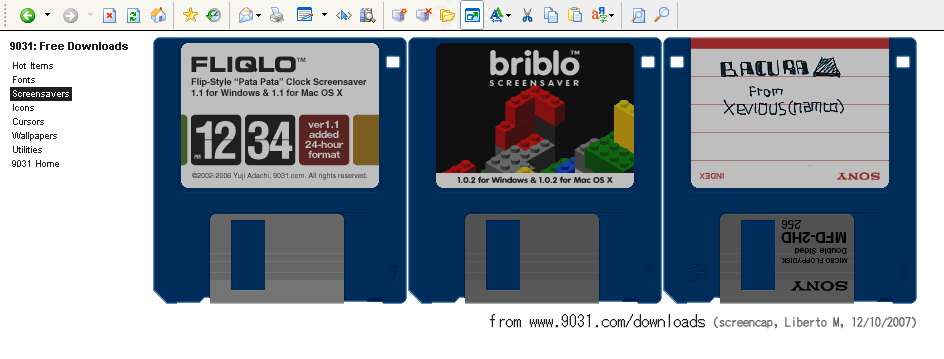
Gee, I wonder what time it is?
~~~ ~~~ ~~~ ~~~ ~~~
A giant clock screensaver:
You can get it from this awsome website ....
~~~ ~~~ ~~~ ~~~ ~~~

November 30, 2007
Why Nero application is called Nero
You know what I only recently figured out?
I've been using the software called "Nero" for about a decade now, but I never got the joke about the name, beyond a vague idea that the pun was clearly about "Nero" and "burning" ....
See, the main program in Nero's "suite" of applications is (and always has been) "Nero Buring ROM". The app was originally used for "burning" CD-ROM disks.
And, of course, the old cliche is "Nero fiddled while Rome burnt" (see "The Great Fire of Rome").
But it turns out that the German name/pronunciation of "Rome" is "Rom" ...
So the program name should actually be read as "Nero Burning Rome"! (where "ROM" is pronounced "rome").
So maybe it's not hilarious, but still amusing enough if you've been using the thing for years ;-)
November 16, 2007
About Vista's "Windows Experience Index"
Title: About Vista's Windows Experience Index (Nov. 2007)
File Under: Microsoft (MS) Windows, Vista, tech
As I explore Vista (recently upgraded), I came across this little tidbit about MS Vista's "Performance Index and Tools" dialog page:
(adapted from mshelp://Windows/?id=60d9b045-e2fe-4f7a-9111-e2f2222851991033", by John Swenson, undated.)
System Specs and Bragging Rights
It’s always been difficult to measure exactly how fast a PC is and to compare its speed to other computers. Sure, you can examine all its hardware components, but that gets complicated, and it’s difficult to compare different brands of hardware. There are various speed benchmarks, but it’s not always clear what those mean or how to measure your computer against them.
It’s a tough situation for any self-respecting power user. How are you supposed to brag to your friends that your PC is faster than theirs? Well, Windows Vista introduces a new way. You can just check your Windows Experience Index score. Your computer’s performance is distilled down to a single number."
In the quest for PC bragging rights, some power users are striving to achieve a perfect Windows Experience Index score. Many are gamers or PC enthusiasts willing to plunk down $500 or more for the latest 3-D video card—or two cards running in tandem ... [et cetera]... All for the elusive goal of achieving a Windows Experience Index score of 5.9.
Wait a minute—5.9 ??
As one person on a Gizmodo.com forum wrote, “What marketing genius decided to make it a 5.9 scale?”
The technical wizards on the Windows team who designed this new tool for measuring the speed of a PC settled on a scale of 1 to 5.9 -- not 1 to 10, as you might expect -- because "The index is designed to expand and evolve over time."
At some point in the next 12 to 18 months [as of when? - Editor], the Windows team expects to push the maximum score to 6.9, and eventually to 7.9 and beyond. Maybe someday the index will actually reach 10 (or 9.9).
(This will not change any scores on the low end. A PC rated 2.8 will still stay at 2.8 unless it is upgraded with new hardware components.)
[Blah Blah Blah (like Microsoft would know what makes a good tweaked computer)]
As more people post their index scores on ShareYourScore.com, the percentage of people achieving 5.9 is going down, not up, showing just how hard it is get a perfect score. For more information about what your own score means (assuming it’s not perfect), see Understand and improve your computer's performance in Windows Vista.
Well, okay then: here's mine!
(click to view)

~
